Check calls, made for you
At the times you set, GotItDesk calls each driver and asks three things: where they are, their ETA, and whether anything’s wrong. Dispatch gets the answers by email, with delays and problems marked urgent.
No app for drivers. No ELD or TMS link. Just their phone.
Read the sample check call
GotItDeskHi Mike, this is the automated assistant for Ridgeway Freight dispatch, about load 4471 to Memphis. Where are you right now?
DriverI'm on 40, just past Little Rock.
GotItDeskThanks. What's your ETA for delivery?
DriverProbably Tuesday around noon. I sat two hours at the shipper.
GotItDeskGot it, Tuesday around noon. Any other delays or problems?
DriverNope, that's it.
GotItDeskThanks, Mike. I'll let dispatch know. Drive safe.
A scripted call in the voice drivers hear. Ridgeway Freight is made up.
You add the load. We make the calls.
Add a load
The load number, the driver and their mobile, and how often to check. One at a time, or a spreadsheet exported from your TMS.
GotItDesk calls the driver
From your own GotItDesk number, 6 AM to 9 PM in the driver’s time zone. It says it’s the automated assistant for your dispatch and asks three things: where they are, their ETA, and whether anything’s wrong.
Dispatch gets the answer
On your Loads page and by email after every call. Delays, problems and drivers who don’t pick up come first, marked urgent.
Where every driver is, without a call from you
Screens from the real app, filled with a made-up fleet.
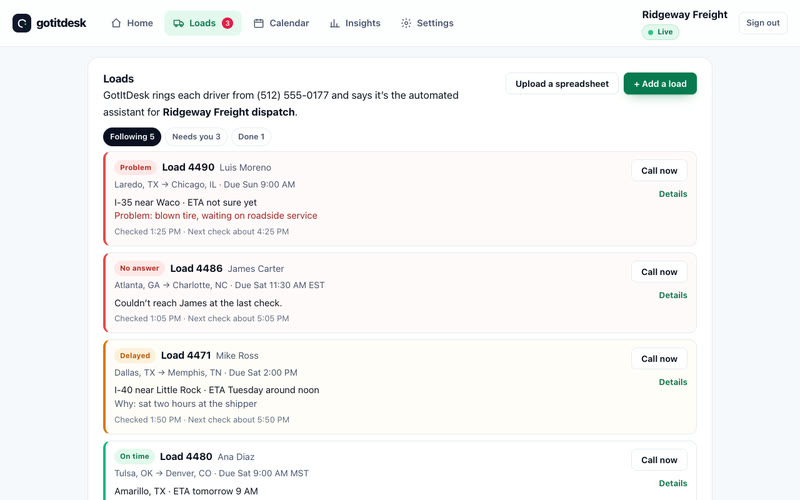
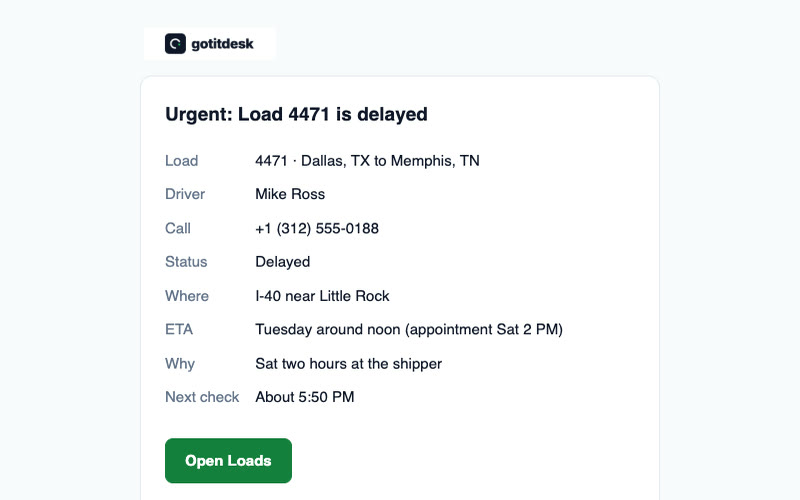
Built around how drivers work
No app, no ELD link
Drivers just answer their phone. Nothing to install, nothing to log in to.
Put through to dispatch
“Put me through to dispatch” rings your phone. A driver who is hurt or broken down is put through, or the problem is taken down as urgent.
If they don’t pick up
One more try 15 minutes later, and one short voicemail asking them to call or text dispatch. Then you get an urgent email.
Their hours, their time zone
Calls go out 6 AM to 9 PM where the driver is, any day. You choose how often: every hour, up to every 12 hours.
“Stop calling me” works
A driver who says it is never called again, and you’re told, so you can call them yourself.
Your name, your number
Calls come from your own GotItDesk number and say your company’s name. A driver who calls back reaches your dispatch line.
One price for your fleet
Check calls
Each driver over 10 is $15 a month. Add a card when you switch it on; cancel before day 30 and nothing is charged. We email you 3 days before the first charge.
Start your 30 days free- Check calls as often as every hour
- The Loads page, and an email after every check
- Your own GotItDesk number
- Drivers who call back reach your dispatch line
- Cancel any time
Questions fleets ask
Do drivers have to install anything?
What does the driver hear?
Do I need the driver’s OK?
Does it work with my TMS?
What if the driver doesn’t answer?
Which number does it call from?
How is it priced?
Where does it work?
Want us to set it up with you?
Book 20 minutes on Google Meet. We add your first loads with you, ring your own phone with a test check call, and answer your questions.